01The problem
A movie, TV and music collection spread across dozens of external drives is hard to search: you can't tell what you own or which drive holds it without plugging drives in one by one. MediVault puts the whole catalog in one fast, offline app and answers 'where is it' for every title, down to the drive, folder path and file names.
02Who it is for
Collectors with a large personal media library on many external drives who want to browse, filter and find titles offline.
03Features
- Opens from index.html: no server, no internet, no dependencies
- Search across titles, actors, directors, franchises and file names ('/' to jump to search)
- Filter panel on every list with live counts (genre, region, language, decade and more)
- 'Where is it' on every title: drive, folder path, files, Copy path and other locations
- Curated lists (Top 50, Oscar winners, best by genre) plus World Cinema sections
- Browse by collection, drive, genre, decade, language and people
- Music: 1,953 albums filterable by folder, format (FLAC, Hi-Res, MP3) and albums vs music videos
- Album pages with track list, size and path; Browse artists; duplicates merged under 'Also on'
- Watchlist and Recently Viewed saved in the browser
- Responsive layout with a collapsible sidebar and mobile drawer
04Pages & screens
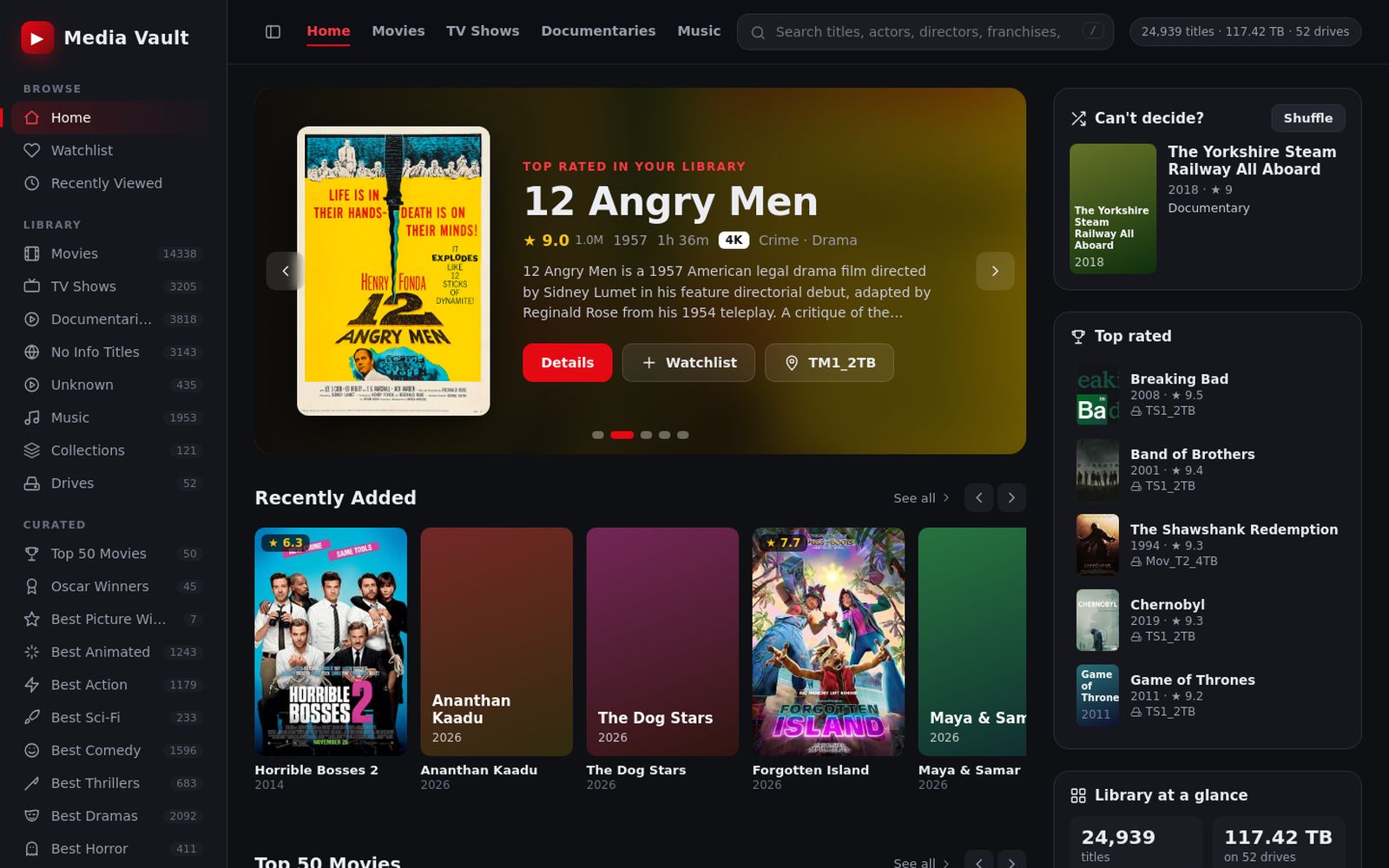
- Library home (featured carousel, Recently Added, Top rated, Library at a glance)
- Title detail with 'Where is it' panel
- List views with filter panel (Movies, TV Shows, Documentaries, curated lists)
- Search results
- Collections, Drives, Genres, Decades, Languages, People
- Music albums
- Album page
- Artists
- Watchlist and Recently Viewed
05Stack
06How I built it with AI
Built by Srini with AI tools, iterating version by version up to v0.6. The AI-assisted work covered generating the catalog data and poster set from the drive catalogs, writing the plain-JS single-page app, and adding features in passes: v0.6 finished the pending poster downloads (14,018 titles with local posters, up from 12,176) and added the Music section, grouped from the Music drive's folders, with Telugu/Hindi film soundtrack folders grouped and YouTube tutorial folders and the recycle bin skipped. The v0.6 changelog records a full browser run across every main page with zero errors. No prompt or conversation file was included, so no prompt excerpts are quoted.
07Design highlights
Zero-install by design: all data ships as JS files so the app runs straight from index.html with no server
'Where is it' panel makes the physical drive and folder path the hero of every title page, with one-click Copy path
Paths always start with the drive's volume label (e.g. Music\English\...), never a Windows drive letter, so they stay valid when drive letters change
Streaming-app look (dark theme, poster rows, featured carousel) applied to a personal offline archive
Sidebar sections appear automatically when the data contains them (TV Shows, Music, Korean, more drives), so new catalogs need no code changes
08Gallery
Screens from the working build; click any image to zoom. Names, contacts and figures in the screens are demo content.